-
Shop
- Adidas
- Advanced Technologies
- Bathroom
- Best-Sellers
- Car Accessories
- Dating & Social Skills
- Digital Resources
- AI & Technology
- AI Skills
- Beauty
- Budgeting & Saving
- Car Buying & Ownership
- Cozy Feast Collection
- Electronics & Technology
- Emotional Intelligence
- Entrepreneurship & Business Growth
- Financial Education
- Financial Independence
- Financial Mindset & Psychology
- Goal Setting
- Home Styling & Organization
- Kitchen & Recipes
- Leadership
- Mindfulness
- Mindset
- Motivation
- Online Business
- Parenting & Child Development
- Personal Style & Fashion
- Pet Lifestyle & Wellness
- Positive Thinking
- Productivity
- Self Confidence
- Sleep Improvement
- Smart Life with AI
- Stress Management & Relaxation
- Travel Planning
- Wellness
- Yoga & Fitness
- Yoga & Mind-Body Practices
- Easter Products
- Education & Learning
- Family & Parenting
- Fashion
- Alexander McQueen
- Bags
- Bags & Wallets
- Balenciaga
- Belts
- Blazers
- Bottega Veneta
- Brunello Cucinelli
- Burberry
- Chanel
- Chloé
- Dior
- Dolce & Gabbana
- Dresses
- Etro
- Fendi
- Gucci
- Hats & Hair Accessories
- Jewelry
- Jil Sander
- Keychains
- Kiton
- Luggage
- Miu Miu
- Off-White
- Outerwear
- Prada
- Rick Owens
- Saint Laurent
- Shoes
- Socks & Tights
- The Row
- Tom Ford
- Valentino
- Valentino Garavani
- Versace
- Vivienne Westwood
- Watches
- Furniture
- Gadgets
- Health & Beauty
- Health & Wellness
- Home & Garden
- Home Electronics
- Kids & Babies
- Kitchen
- Lighting
- Patio, Lawn & Garden
- Personal Growth
- Pet Care
- Pet Supplies
- Pets
- Smart Home Living Guides
- Sport & Outdoors
- Stress Relief & Relaxation
- TikTok Growth & Monetization Mastery
- Travel
- Wealth
- Wealth Building
- Popular
- Best deals
Mini HD Projector 1080P Support: WiFi, BT & Keystone
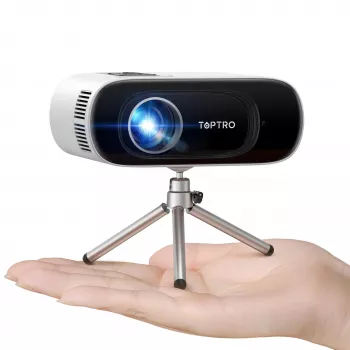
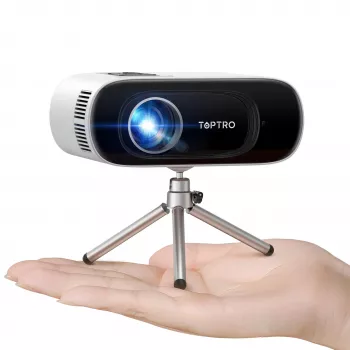
Mini HD Projector with 1080P Support, WiFi, Bluetooth, and Auto Keystone: What It’s Like to Use
A compact projector can turn a bedroom wall, dorm room, or backyard screen into a big-picture viewing setup without committing to a large TV. The appeal is simple: easy portability, flexible placement, and modern wireless features that reduce cable clutter. This guide explains what a 1080P-support mini HD projector is designed to do, how WiFi, Bluetooth, and auto keystone change day-to-day use, and the setup habits that usually lead to a sharper, more enjoyable image in smaller spaces.
What This Mini HD Projector Is Designed For
This style of mini projector is best when convenience and flexibility matter more than building a dedicated home theater.
- Casual movie nights, streaming shows, kids’ rooms, and occasional presentations
- Small-to-medium viewing areas where portability and quick setup matter
- Users who want wireless playback options alongside traditional cable connections
Standout Features at a Glance
On paper, the mix of 1080P support, WiFi, Bluetooth, and auto keystone covers the most common friction points: getting video onto the projector, getting sound that fills a room, and squaring up the picture quickly.
| Feature | Why it matters | Practical tip |
|---|---|---|
| 1080P support | Allows Full HD content to display with more detail than standard definition | Use a high-quality source and avoid extreme digital zoom to keep edges crisp |
| WiFi | Reduces cable clutter for supported casting methods | Place the projector within a strong router signal area to limit stutter |
| Bluetooth | Improves audio by pairing to a larger speaker | If lip-sync is off, try a wired connection or adjust delay on the speaker/app |
| Auto keystone | Quickly squares the image when placed at an angle | Keep tilt minimal; heavy correction can reduce sharpness at corners |
| Portability | Easy to move room-to-room or outdoors | Use a stable stand/tripod and manage power cable strain |
Image Quality: 1080P Support and Real-World Sharpness
“1080P support” typically means the projector can accept a 1920×1080 signal and play it back, but perceived sharpness still depends on the projector’s native display resolution, lens quality, and how much digital correction is being applied. In real rooms, sharpness is often won or lost with setup basics: center the projector as much as possible, set a reasonable throw distance, then focus carefully.
For the cleanest picture, keep the projector close to the screen’s centerline and minimize digital keystone. A slightly smaller image that’s well-focused and minimally corrected often looks clearer than a giant image that relies on aggressive keystone and digital zoom. If you’re projecting onto a wall, smoother paint and lighter colors can also help perceived detail—wall texture and heavy color tinting can soften edges and shift colors.
Brightness and Room Lighting: What to Expect
Brightness claims vary widely by measurement method and marketing standards, so it helps to think in terms of conditions rather than numbers. The biggest “brightness upgrade” is usually controlling ambient light: dim the room, block sunlight, and avoid lamps shining directly on the wall or screen.
- For daytime viewing, use curtains/shades and aim for indirect, softer room lighting.
- For outdoor use, plan for dusk or nighttime to improve contrast and color saturation.
- For apartments and dorms, a small portable blackout curtain or window shade can make a noticeable difference.
If you want a simple reference point for connection standards used by many sources you might plug in, HDMI details are maintained by the HDMI Licensing Administrator.
Auto Keystone: Helpful, but Use It Wisely
Auto keystone is designed to fix the “trapezoid” effect that happens when the projector is tilted up/down or placed off to one side. It’s a great time-saver for quick setups—like moving from a coffee table to a nightstand—but it’s also a digital correction that remaps pixels.
WiFi: Wireless Streaming and Screen Mirroring Considerations
For background on WiFi standards and certification, the Wi‑Fi Alliance is a reliable source.
Bluetooth: Better Sound Without a Long Cable Run
One common tradeoff is latency: some Bluetooth connections add a slight delay that can show up as lip-sync mismatch. If that happens, try a wired audio option (when available) or use a speaker/app that allows audio delay adjustment. Keep the speaker within short range and avoid stacking too many wireless devices nearby to reduce interference. For Bluetooth standards and device ecosystem info, see the Bluetooth SIG.
Placement and Setup Tips for a Sharper Picture
Best Use Cases
When a Mini Projector May Not Be the Best Fit
Quick Buying Checklist for This Style of Projector
In-Stock Picks
- Mini HD Projector 1080P Support, 16000 Lumens, WiFi Bluetooth, Auto Keystone — $86.51
- How Essential Oils Can Ease Stress and Anxiety | Relaxation eBook Guide for Natural Stress Relief, Aromatherapy, and Anxiety Support — $16.99
FAQ
Does 1080P support mean the projector is native 1080P?
No. 1080P support usually means it can accept a 1080P input signal, while native resolution is the projector’s actual pixel grid. Final clarity also depends on lens quality, focus, screen distance, and how much keystone correction is applied.
Can Bluetooth be used to connect a phone for video playback?
Bluetooth is typically used for audio output to speakers or headphones, not for sending video. Video playback is usually delivered through WiFi casting/screen mirroring or a wired connection like HDMI, depending on device and app compatibility.
Why does the image look less sharp after auto keystone?
Auto keystone is a digital correction that resamples and remaps pixels to square the image, which can soften fine detail—especially with heavy correction. For a sharper picture, physically center the projector as much as possible and use minimal keystone.
Recommended for you

Can Lead Catch Fire? Heat, Melting, and Safety Risks
Sep 19, 2026











Leave a comment