-
Shop
- Adidas
- Advanced Technologies
- Bathroom
- Best-Sellers
- Car Accessories
- Dating & Social Skills
- Digital Resources
- AI & Technology
- AI Skills
- Beauty
- Budgeting & Saving
- Car Buying & Ownership
- Cozy Feast Collection
- Electronics & Technology
- Emotional Intelligence
- Entrepreneurship & Business Growth
- Financial Education
- Financial Independence
- Financial Mindset & Psychology
- Goal Setting
- Home Styling & Organization
- Kitchen & Recipes
- Leadership
- Mindfulness
- Mindset
- Motivation
- Online Business
- Parenting & Child Development
- Personal Style & Fashion
- Pet Lifestyle & Wellness
- Positive Thinking
- Productivity
- Self Confidence
- Sleep Improvement
- Smart Life with AI
- Stress Management & Relaxation
- Travel Planning
- Wellness
- Yoga & Fitness
- Yoga & Mind-Body Practices
- Easter Products
- Education & Learning
- Family & Parenting
- Fashion
- Alexander McQueen
- Bags
- Bags & Wallets
- Balenciaga
- Belts
- Blazers
- Bottega Veneta
- Brunello Cucinelli
- Burberry
- Chanel
- Chloé
- Dior
- Dolce & Gabbana
- Dresses
- Etro
- Fendi
- Gucci
- Hats & Hair Accessories
- Jewelry
- Jil Sander
- Keychains
- Kiton
- Luggage
- Miu Miu
- Off-White
- Outerwear
- Prada
- Rick Owens
- Saint Laurent
- Shoes
- Socks & Tights
- The Row
- Tom Ford
- Valentino
- Valentino Garavani
- Versace
- Vivienne Westwood
- Watches
- Furniture
- Gadgets
- Health & Beauty
- Health & Wellness
- Home & Garden
- Home Electronics
- Kids & Babies
- Kitchen
- Lighting
- Patio, Lawn & Garden
- Personal Growth
- Pet Care
- Pet Supplies
- Pets
- Smart Home Living Guides
- Sport & Outdoors
- Stress Relief & Relaxation
- TikTok Growth & Monetization Mastery
- Travel
- Wealth
- Wealth Building
- Popular
- Best deals
10mm Dynamic Driver MMCX IEMs for Android: Sound & Setup
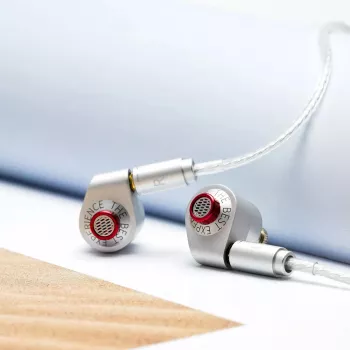
HiFi In-Ear Monitors with 10mm Dynamic Driver & MMCX Cable for Android
A 10mm dynamic driver paired with a detachable MMCX cable can bring satisfying punch, natural vocals, and a straightforward upgrade path for Android listening. Whether you’re commuting, working at a desk, or winding down with playlists, this style of in-ear monitor (IEM) focuses on full-range musicality and day-to-day practicality. Below is what to expect from the sound, why MMCX matters for durability and cable swaps, and how to get consistently great results from USB-C phones and Android audio apps.
Quick overview
- 10mm dynamic driver design aimed at full-range, lively playback
- MMCX detachable cable for easier replacement and cable upgrades
- Works with Android phones and tablets (3.5mm jack or USB-C adapter needed on some devices)
- Good fit for commuting, casual hi-fi listening, and portable setups
Core sound profile from a 10mm dynamic driver
Dynamic drivers are a favorite for portable listening because they can sound cohesive—one driver handling the whole spectrum often delivers a “together” presentation that feels natural across genres. With a 10mm diaphragm, the goal is typically to balance depth and control: enough surface area for sub-bass weight, while still staying quick enough for kick drums and bass lines that need definition.
- Dynamic drivers are known for weighty low-end and a cohesive, “single-driver” presentation that can sound natural across genres.
- A 10mm diaphragm size commonly balances bass extension with speed for drums, bass guitar, and electronic sub-bass.
- Expect a smooth transition from bass to mids when the tuning is well-controlled, helping vocals and guitars avoid sounding thin.
- Treble detail can be clean and non-fatiguing with proper tip selection and a good seal.
One practical note: the same earphones can sound surprisingly different depending on your ear tip seal. If bass feels lighter than expected, it’s often not the driver—it’s the fit. Getting a stable seal usually increases bass extension and also makes mids sound clearer, because outside noise isn’t masking quiet details.
MMCX cable benefits for everyday use
An MMCX connection is all about longevity and flexibility. Instead of treating the cable as a single point of failure, detachable cables make it easy to replace a worn plug, fix a snagged wire, or switch to a cable that better matches your daily routine.
- Detachable connection helps extend product life: a damaged cable can be replaced without replacing the earphones.
- Cable swapping enables different use-cases: inline mic cables for calls, balanced cables for compatible gear, or shorter cables for portable rigs.
- MMCX connectors rotate, which can reduce cable strain during movement and improve comfort depending on ear shape.
- Best practice: disconnect by gripping the connector housing (not the wire) to protect the joint.
For anyone who listens on the move, the rotating connector can also help the cable “settle” into a comfortable angle, especially when wearing the cable over-ear for better stability and lower cable noise.
Android compatibility and getting the best sound
Compatibility is simple once you know what your phone outputs. If your Android device still includes a 3.5mm headphone jack, you can plug in directly. If your phone is USB-C only, you’ll typically need a USB-C to 3.5mm adapter that includes a DAC (a small digital-to-analog converter). Many modern phones do not provide analog audio over USB-C without an active DAC inside the adapter.
If you’re curious about how Android handles audio more broadly, the platform overview at Android Developers — Audio is a useful reference. For USB audio background and compatibility context, the USB-IF documentation library is a good starting point.
Fit, isolation, and comfort tuning
At-a-glance specs and practical notes
| Item | What it means | Why it matters on Android |
|---|---|---|
| 10mm dynamic driver | Single full-range driver | Typically delivers strong bass impact and cohesive imaging for portable listening |
| MMCX detachable cable | Cable connects via MMCX plugs | Enables easy cable replacement and swapping to mic/remote or different lengths |
| 3.5mm connection via cable | Standard headphone plug | Works directly with devices that still have a headphone jack |
| USB-C phones | May require a DAC dongle | A USB-C to 3.5mm adapter with DAC ensures compatibility and can improve sound quality |
| Tip seal/isolation | Fit determines acoustic seal | Better seal improves bass and reduces outside noise for commuting |
Who these in-ear monitors suit best
Shop in-stock picks
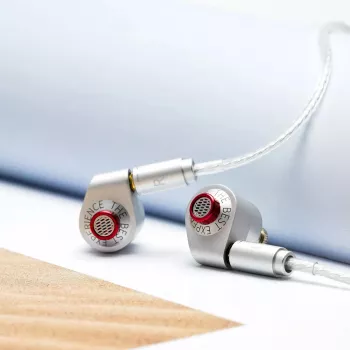
- HiFi In-Ear Monitors with 10mm Dynamic Driver & MMCX Cable for Android
- How Essential Oils Can Ease Stress and Anxiety | Relaxation eBook Guide for Natural Stress Relief, Aromatherapy, and Anxiety Support
- Turn an Old Car Into a Smart Tax Move: A Complete Checklist for Donating Your Car to Charity for a Tax Write-Off
FAQ
Do these work with Android phones that don’t have a headphone jack?
Yes. Use a USB-C to 3.5mm adapter that includes a DAC, plug the earphones into the adapter, then connect it to your phone’s USB-C port.
What is the advantage of an MMCX cable compared with a fixed cable?
MMCX makes the cable replaceable and easy to swap for different needs, like an inline mic cable or a different length. The connector can also rotate, which may reduce strain and improve comfort.
How can bass and clarity be improved quickly?
Start with ear tips and seal: try a larger tip size or a different tip material for a tighter fit. If your phone sounds weak or noisy, a better-quality Android DAC dongle can also help.
Recommended for you
Fleece Joggers in Winter: Warmth, Limits, Layering
Jul 14, 2026













Leave a comment